What Does Research Say About...
Planning for Effective Integration of Technology in the Curriculum
This post explains how to design an effective lesson plan that will increase the integration of technology using the ASSURE Model (Smaldino et al., 2019). The ASSURE Model consists of six considerations: Analysis of Learners, Standards and Objectives, Selection of Strategies and Resources, Utilization of Resources, Required Learner Participation, and Evaluation and Revision (Smaldino et al., 2019). The lesson design was implemented in a first-grade, self-contained classroom to increase the use of technology in a social studies research project on historical African American figures. The students chose an African American figure from a “Histogram” bulletin board (TeachersPayTeachers & Learning With Lexie, n.d.) that was displayed in the common area of the school. The lesson was designed to promote collaboration, exploration, and student choice and transition students from the Entry Level to the Adaptation Level of the Technology Integration Matrix (TIM) (Florida Center for Instructional Technology, 2019). Students were permitted to choose websites of their choice to complete the research project. The information gathered was used to create a Conceptual Announcement in the class team on Microsoft Teams (Microsoft, 2017).
Current Level of Technology of Integration
Students are currently integrating technology at the Entry Level of the TIM in the following learning environments: Active Learning, Constructive Learning, Authentic Learning, and Goal-Directed Learning (Florida Center for Instructional Technology, 2019). The teacher facilitated the usage of technology and understood the value of student-centered implementation and learning. Therefore, the lesson plan was designed to transition students to the Adaptation Level in all learning environments of the TIM. Students chose to be paired or grouped and were provided laptops to research the chosen African American figure. Students also chose their method of online research. Some websites the students chose were Google (Page & Brin, 1998), Epic Books (EPIC!, 2013), YouTube (Chen et al., 2005), and National Geographic Kids (National Geographic World, 1975). Students will use Microsoft Teams (Microsoft, 2017) to present their Conceptual Announcements and information about their historical African American figure on the class team.
ASSURE Lesson Plan
Title: Researching Historical African American Figures
Duration of Lesson: 30 minutes (10-15 Days)
Subject: English Language Arts/ Social Studies
Analyze Learners
The lesson plan is designed for 21 first-grade students, ranging from 6 to 7 years of age, in a Title 1 (low socioeconomic) school in a suburban area in a large urban district. Eleven students are boys, and ten students are girls. The students are digital novices and have never independently used computers for researching informational text in an educational setting. Although some students can access non-educational videos on YouTube (Chen et al., 2005), the students consistently use computers to complete weekly district-mandated blended learning platforms during instructional time and center rotations. Nineteen percent of the students have access to computers or tablets at home. Therefore, most of their interactions with computers and technology are during school hours. The students have not used search engines to research topics nor created digital Conceptual Announcements on Microsoft Teams (Microsoft, 2017) and will need guidance in creating announcements of historical African American figures.
State Standards and Objectives
Florida B.E.S.T. Standards:
Research Standards/Benchmarks: ELA.1.C.4.1: Participate in research to gather information to answer a question about a single topic.
Technology in Communication Standard/Benchmark: ELA.1.C.5.2: Identify and use digital tools to produce and publish writing individually or with peers and with support from adults.
ISTE Standards for Students: 1.3. Knowledge Constructor Students critically curate a variety of resources using digital tools to construct knowledge, produce creative artifacts, and make meaningful learning experiences for themselves and others.
- 1.3.a. Plan and employ effective research strategies to locate information and other resources for their intellectual or creative pursuits.
ISTE Standards for Educators: 2.3. Citizen Teachers inspire students to positively contribute and responsibly participate in the digital world.
- 2.3.b. Establish a learning culture that promotes curiosity and critical examination of online resources and fosters digital literacy and media fluency.
Objectives: The first-grade students will use search engines to research a historically African American figure to gather information for a digital presentation. After gathering information about their historical figure, the students will create a digital Conceptual Announcement about a historically African American figure on Microsoft Teams with 80% accuracy (4 out of 5 elements).
Select Strategies and Resources
1. Students will choose an African American figure from the Histogram Bulletin Board (TeachersPayTeachers & Learning With Lexie, n.d.) displayed in the common area of the school. (See Appendix C). Students have a choice to work with a partner, group, or independently. Students will use a teacher-created graphic organizer to record information about the African American figure before receiving a laptop. (See Appendix D). The students must record the correct spelling of the historical figure before accessing the Internet.
2. Students sit through a brief tutorial on how to use a search engine and access websites like National Geographic Kids (National Geographic World, 1975) or YouTube (Chen et al., 2005). Students are also reminded to access familiar sites like Epic Books (EPIC!, 2013) and given an option of sources they can use to complete the research project. Students are also provided safety guidelines and discouraged from using inappropriate sites that have been blocked by the district.
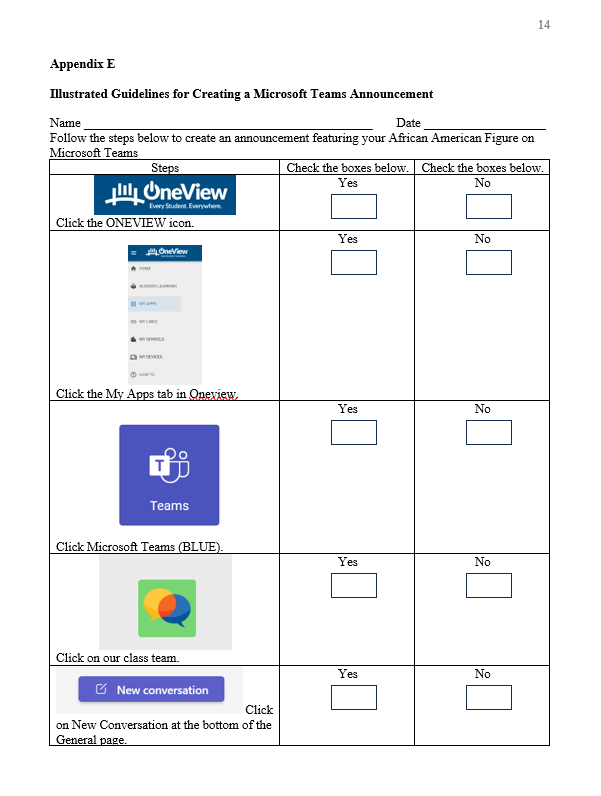
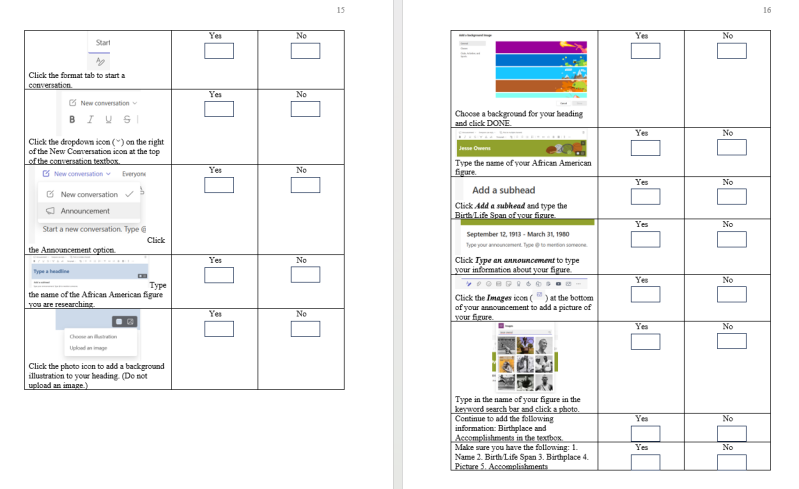
3. Next, students are provided a systematic guide and checklist to create Conceptual Announcements on Microsoft Teams (Microsoft, 2017). The guide includes screenshots within each step to present a visual reference. (See Appendix E).
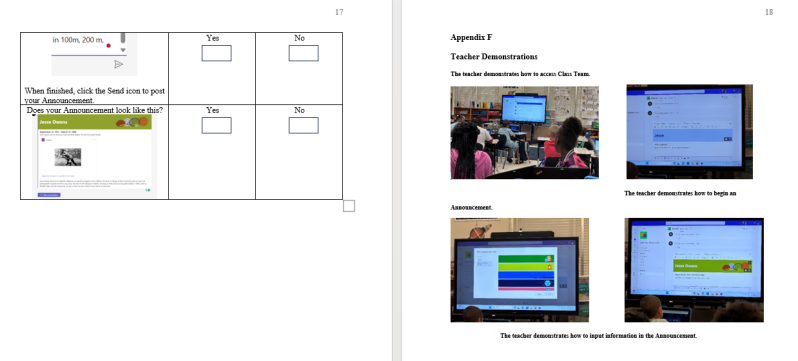
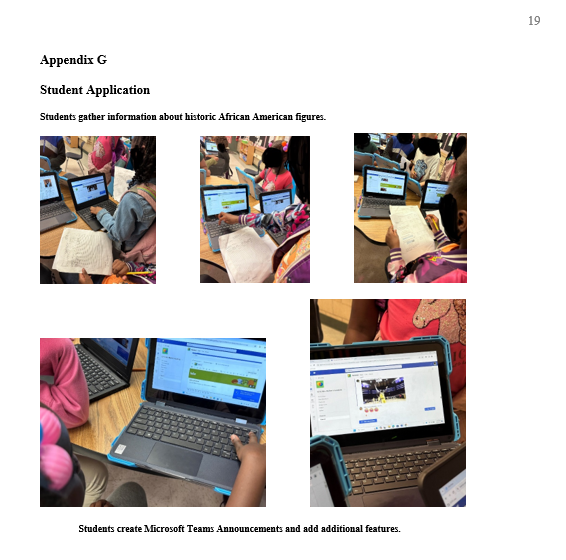
4. Once students have gathered the information about the historical figure on the graphic organizer, they are seated in small groups for a brief tutorial on how to access the designated Class Team to post their announcements. (See Appendix F and G). They are provided with an illustrated guide and checklist. The teacher is present to assist with questions and confirmations. At that time, students will receive directions on how to send their posts and retrieve their posts to edit their announcements.
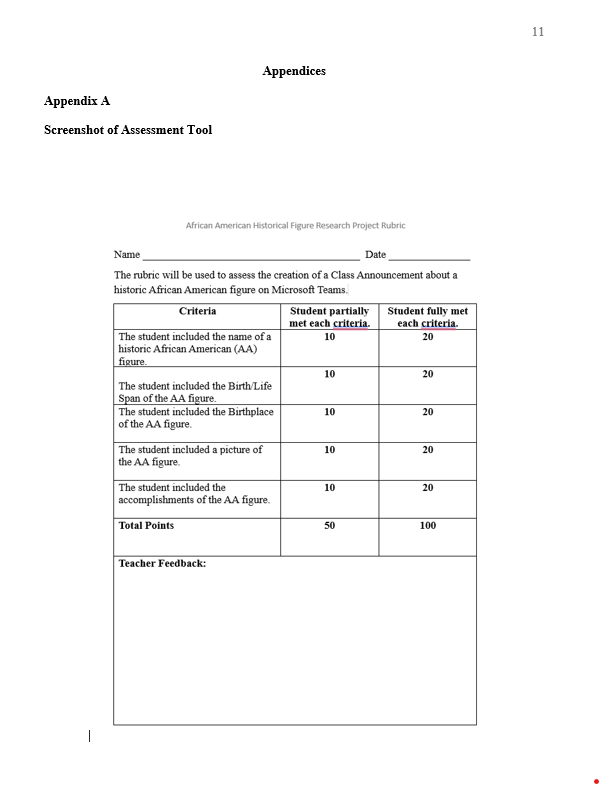
5. Once the students are finished, the teacher will assess the Announcements using a rubric that mirrors the illustrated checklist. The students will receive 20 points for each element included in their Announcement (Name, Picture, Birth/Life Span, Birthplace, Accomplishments) totaling 100 points.
6. Once students have posted their announcements, they may comment under their peers’ Announcements to discuss their discoveries and wonderings.
The technology used in the lesson is the computers used to access the Internet, and the Media used is Microsoft Teams.
Utilize Resources
Preview & Prepare Resources: Students will use two teacher-generated resources: a graphic organizer, and the illustrated guidelines to post announcements. Students will access laptops, the Internet, Google (Page & Brin, 1998), National Geographic Kids (National Geographic World, 1975), Epic Books (EPIC!, 2013), YouTube (Chen et al., 2005), and Microsoft Teams (Microsoft, 2017) to post Announcements about the historic African American figure.
Prepare Learners: Students will receive a brief tutorial on the use of search engines and the Internet along with safety guidelines.
Students will also receive a demonstration of how to access Microsoft Teams, the Class Team, and how to post an announcement.
Prepare the Environment: Students will sit at the small group table when posting Announcements to Microsoft Teams and with their partners in their seats when researching or gathering information.
Prepare the Learning Experience: Students will use their illustrated guidelines to create and post their Conceptual Announcements. They will also post their comments, discoveries, or wonderings under completed Conceptual Announcements.
Require Learner Participation
Students will receive feedback about their digital Conceptual Announcements and the process they use to create their announcements. Students will be permitted to ask questions to confirm or reaffirm their thought process during the creation of their Conceptual Announcements. The teacher will provide specific details to help students adjust, edit, and enhance the information in their Conceptual Announcements. The teacher will also ensure students have completed the research phase before creating a Conceptual Announcement and remind students to use the illustrated guidelines before asking questions. This is to promote a healthy struggle and foster independence during the learning experience.
Evaluate and Revise
Student projects will be graded with a rubric with the specification of the inclusion of five elements: 1. Name of African American figure, 2. Birth/Life Span, 3. Picture, 4. Place of Birth, and 5. Accomplishments. (See Appendix A).
The teacher will post comments under the Announcements to highlight areas of missing information or suggestions for improvements before providing the final grade.
The Conceptual Announcements posted on the Class Team of Microsoft Teams (Microsoft, 2017) are performance assessments and will be graded with a rubric.
The teacher will analyze the rubric to determine the next steps and reflections for the future integration of technology.
Reflection and Next Steps: Teachers should preview the student's limitations and permissions in Microsoft Teams. For example, teachers have permission to insert pictures; however, students have access to insert GIFs. The images feature was disabled. Teachers should also consider teaching computer operations in small groups and be mindful of assumptions that young students are digital natives. Teachers should teach the terminology and vocabulary for basic computer operations and software.
Teachers should provide guidelines for proper communication on Microsoft Teams and guidelines for posting comments to prevent disruptions in student productions. For example, students may post under their peers’ announcement drafts which becomes a disruption and a source of frustration to the creators of the content. Provide time for responses once all announcements have been finalized. Also, provide guidelines for appropriate responses and discuss the use of emojis. Comments should be accountable and relevant to the content presented.
References
Chen, S., Hurley, C., & Karim, J. (2005, December 15). YouTube. YouTube. www.youtube.com
EPIC!. (2013). Instantly access over 40,000 of the best books & videos for kids on epic. Epic - Books for Kids. https://www.getepic.com/about
Florida Center for Instructional Technology. (2019, June 1). Technology integration matrix. TIM. https://fcit.usf.edu/matrix/matrix/
Microsoft. (2017). New microsoft teams for education (edu) - microsoft teams. Microsoft Teams. https://learn.microsoft.com/en-us/microsoftteams/new-teams-education
National Geographic World. (1975). National geographic kids. National Geographic Kids. www.kids.nationalgeographic.com
Page, L., & Brin, S. (1998, September 4). Google. Google. www.google.com
Smaldino, S. E., Lowther, D. L., & Mims, C. (2019). Instructional technology and media for learning (12th ed.). Pearson.
TeachersPayTeachers & Learning With Lexie. (n.d.). Learning with lexie: Black history month bulletin board. TPT. https://www.teacherspayteachers.com/Store/Learning-With-Lexie